Small ideas on legal practice, research and technology

Expert Witnesses

Finding an expert or seeing if an expert has been qualified as such can be a challenging legal research exercise. Here are some tips and links to help you.

Tip 1

Use the Canadian Expert Witness Directory through Litigator on WestlawNext Canada. The directory links to cases the expert has been qualified in. You need a WNC password and access to the Litigator component for  this of course, but it is a great place to start.

Tip 2

To find out if there are experts on your issue whose expertise has been qualified by the courts, search on CanLII …

Posted in: Research & Writing

Health Care Practitioners: Please Don’t Keep Notes About Your Patients’ Discussions With Their Lawyers

Today’s tip is for health care practitioners whose patients are involved in litigation.

We recognize that it might be natural, and even good practice, for medical practitioners to ask their patients how their lawsuits are going.

Particularly for those practitioners who provide counselling, these discussions may be essential to your work.

Lawsuits can weigh heavily upon the psyches of those who find themselves involved in the legal system. The litigation itself can be very foreign and stressful. The future may in a very real way hinge on the outcome of their lawsuits. There may even be stressful issues between your …

Posted in: Practice

Use Colour

Today’s research tip is more about research output than gathering. Do not be afraid to use colour to add visual clues to your research output. Using coloured text or tables is not appropriate for pleadings of course, but why not present your client with some visual clues in your opinions?

For instance, a table showing research results representing a quantum of damages could have background colour with the high low and mid-range results.  If your organization incorporates colour into your brand, this colour wheel will help with shading.

For instance, if your colour is purple, shading a table or even …

Posted in: Research & Writing

How to Avoid a Dead Cell Phone When Travelling

♫ Cell phone’s dead
Lost in the desert
One by one…♫

Lyrics and music by Beck Hensen.


[Image courtesy of holohololand at FreeDigitalPhotos.net]

Having just returned from a long tenting camping vacation where my Blackberry was dead for most of the trip, I thought I would pass along some tips on how to avoid the kind of experience that I just went through.

Notwithstanding that we were travelling with both an iPhone and a Blackberry and charging them equally in the vehicle when on the road (courtesy of having USB connectors that …

Posted in: Practice

Linking for Law School Electronic Case Books

Thanks to Sooin Kim, Faculty Services Librarian with the Bora Laskin Law Library, University of Toronto there is another type of link creation tool to share.  Thess tools are made for a specific purpose – to assist with building links to material that will be used at law schools.

Sooin shared the WestlawNext Link Creator https://lawschool.westlaw.com/admin/wllinkcreator/wllinkcreator.aspx. It is a nifty little tool that will build a link to a specific citation, a KeyCite record, a particular database or to a specific query.  It also offers the link in three formats: URL, Iframe, and Hypertext link with all of …

Posted in: Research & Writing

Windows 10? Whatever…


Windows 10?  Yawn.

If nothing else, the imminent launch of the new Windows OS gives us opportunity again to wonder why the Powers-That-Be at Microsoft continue to fail to grasp the obvious:

In terms of user interface, they got it right – with Windows XP.  Its been mostly downhill from there.

XP set the gold standard for user satisfaction.  That seminal OS would probably still have many millions of added, happy home and office users if the company hadn’t eliminated support for it a bit more than a year ago.

At its front-end, Windows 7 represented fairly lateral change …

Posted in: Practice
Deep Links to CanLII

To continue the theme from the last couple of weeks, Today’s Tip is about linking in to CanLII.  The tips for WestlawNext Canada and LexisNexis Canada have been about linking to a specific source within the services and that makes sense for CanLII as well.

Stable, predictable, readable URLs are one of the truly wonderful things about CanLII.

What is the start page for searching Statutes and Regulations of Alberta?

http://www.canlii.org/en/ab/laws/index.html

How about Ontario legislation?

http://www.canlii.org/en/on/laws/index.html

The legislation of Manitoba?

http://www.canlii.org/en/mb/laws/index.html

The pattern for decisions is also very predictable and stable. The case R.

Posted in: Research & Writing

Deep Linking to Westlaw Canada Sources

Last week, I gave a shout out to Ted Tjaden for sharing some info about deep linking to LexisNexis Canada sources, and I am continuing to thank Ted this week. Ted shared some information about deep linking into WestlawNext Canada.

Deep-linking to the Canadian Abridgment:

https://nextcanada.westlaw.com/Browse/Home/AbridgmentTOC/TOR.XVI.6/View.html (this should be strict liability, rule in Rylands v Fletcher)

When you are in the Abridgment, you can usually get the abridgment schema code and simply insert it in the foregoing URL.  The portion of the URL above that is the schema code is TOR.XVI.

I have had good luck with jumping …

Posted in: Research & Writing

Deep Linking to LexisNexis Canada Sources

Hat tip to Ted Tjaden for Today’s Tip. Ted is a fan of deep linking to sources including fee based sources of legal research.  I am a fan of Ted, including his excellent Irwin Law text Legal Research and Writing which has a companion website. Ted recently shared the pattern of how to deep link to specific material in LexisNexis Canada.

As you may know, not all databases in QL give you the “hyperlink” option.The following pattern gives you a stable URL to a single database:

ICLIP = http://www.lexisnexis.com/ca/legal/search/UrlApiShowSearch.do?sfi=CA03STCmtrySrch&csi=281866

The only variable is the CSI number. You can get …

Posted in: Research & Writing

ScanSnap Is a Snap!!!!

♫  Snap, what a happy sound
Snap is the happiest sound I’ve found
You may clap, rap, tap, slap but
Snap… makes the world go round…♫

Lyrics and music by Moosebutter.

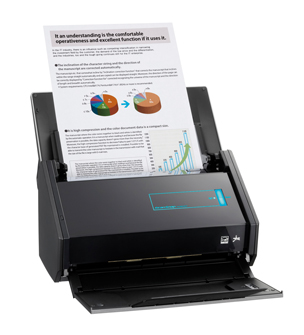
Continuing with the theme of technology that just works, I would be remiss if I didn’t mention the Fujitsu ScanSnap iX500.

This little scanner punches way above its weight.  In fact in the years that I have been talking about scanners and going paperless, no one has ever said that they have regretted purchasing one of the ScanSnap line of scanners.  They have been a hit with …

Posted in: Practice